API
Use the API to put Holobiont AI into your own apps and servers: ask the chat questions grounded in your knowledge base, keep your supplement catalog and biomarker list up to date, and analyse meal photos.
- Base URL:
https://dashboard.holobiont.io/api/v1 - Interactive reference: dashboard.holobiont.io/api-docs
- OpenAPI specification: dashboard.holobiont.io/api/v1/openapi.json
Everything you create or read through the API belongs to your company: every key of the company and every user of the dashboard see the same conversations, supplements, biomarkers and analyses.
Getting an API key
API keys are created by company leaders:
- Go to My Company → API Keys.
- Click New key, give it a name and tick the scopes it may use.
- Click Create key and copy the key. It starts with
hb_live_and is shown only once.
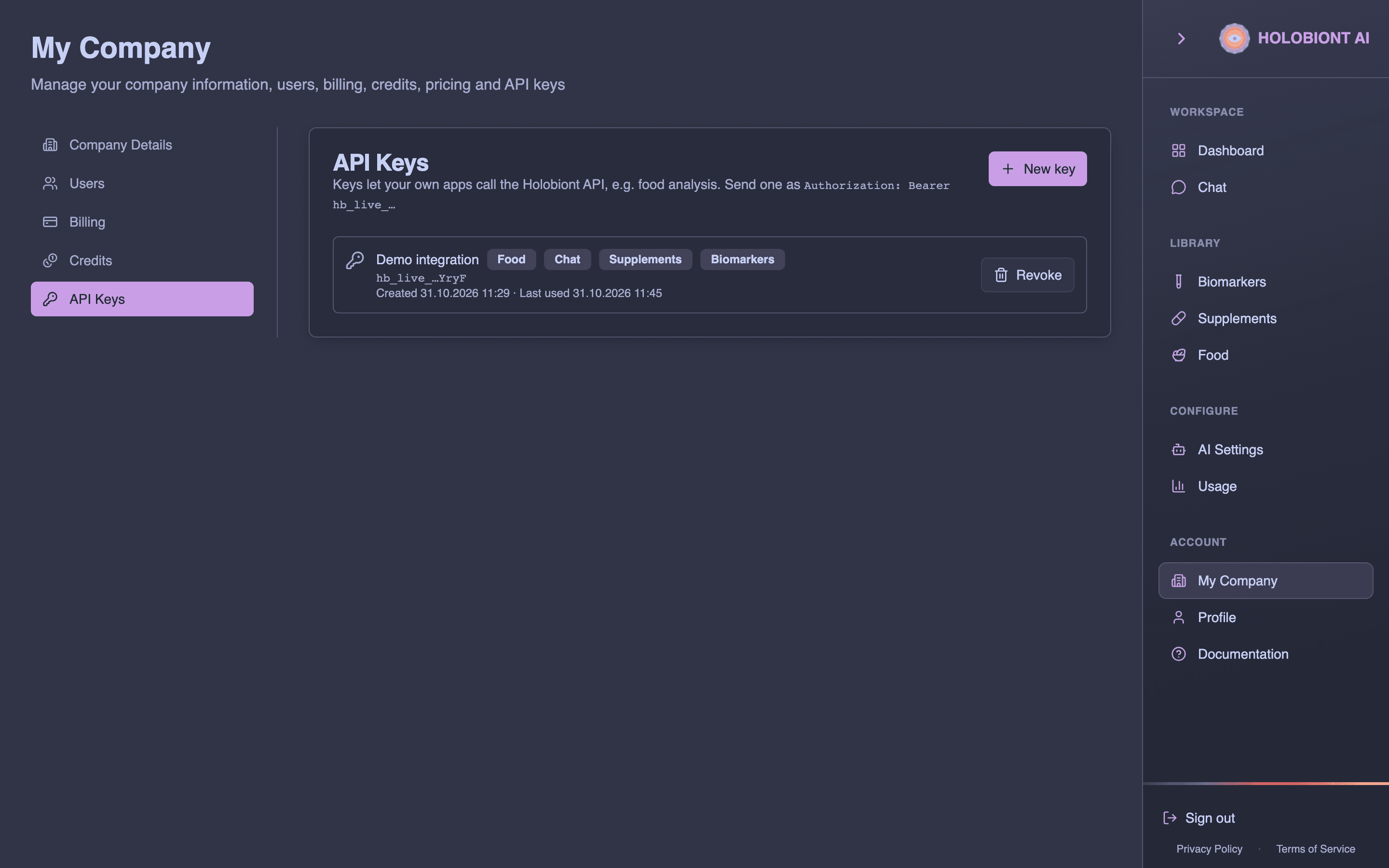
A company can have up to 25 active keys. If a key leaks or you lose it, revoke it in API Keys and create a new one; requests with a revoked key are refused immediately. See My Company for details.
Keep keys on your server. Don’t put them in mobile apps or web pages where users could read them.
Scopes
A key can only call the parts of the API it was given when it was created:
| Scope | Allows | Endpoints |
|---|---|---|
chat | Asking questions and reading or deleting conversations | /chat… |
supplements | Reading and editing the supplement catalog, importing products from web pages, generating sections with AI, research citations and literature search | /supplements… |
biomarkers | Reading and editing the biomarker list, importing biomarkers from web pages, generating recommendations | /biomarkers… |
food | Meal photo analysis, nutrition lookups and biomarker opinions on meals | /food… |
Calling an endpoint outside the key’s scopes returns 403 with code SCOPE_REQUIRED. Keys created when only the Food API existed have the food scope alone; create a new key to use the other parts.
Authentication
Send the key as a bearer token in the Authorization header of every request:
Authorization: Bearer hb_live_YOUR_KEYAll requests and responses use JSON (Content-Type: application/json), except the photo upload, which can also be sent as multipart/form-data.
Errors
Errors return a JSON body with a readable error message and a stable code:
{ "error": "This API key is not allowed to use the chat API", "code": "SCOPE_REQUIRED" }| Status | Code | Meaning |
|---|---|---|
400 | VALIDATION_ERROR | A missing or invalid field or parameter. The message says what’s wrong. |
401 | – | The Authorization header is missing. |
401 | INVALID_API_KEY | The key is unknown or malformed, or the header isn’t Bearer <key>. |
401 | API_KEY_REVOKED | The key has been revoked. |
402 | OUT_OF_CREDITS | Your company’s credits don’t cover the call. The body also has balance and required (in euros) and creditsUrl. |
402 | PLAN_LIMIT | A monthly limit of your account has been reached (chat messages or food analyses). |
403 | SCOPE_REQUIRED | The key doesn’t have the scope the endpoint needs. |
403 | FEATURE_UNAVAILABLE | The feature isn’t available for your account. The body has upgradeUrl, where you can contact us to enable it. |
404 | NOT_FOUND | No conversation, supplement, biomarker, analysis or food with that id belongs to your company. |
429 | RATE_LIMITED | Too many requests. Wait the number of seconds in the Retry-After header. |
502 | CHAT_FAILED | The chat answer couldn’t be completed (for example it took too long). Try again. |
500 | INTERNAL_ERROR | Something went wrong on our side. Try again. |
The food endpoints were published before the other parts and keep their original codes so existing integrations don’t break: CREDITS_EXHAUSTED instead of OUT_OF_CREDITS, PLAN_LIMIT for both the monthly cap (402) and a feature that isn’t enabled (403), and the photo-specific INVALID_IMAGE, NOT_FOOD and MEDICATION (422). They are listed under Food.
Credits
Everything the API does is paid from your company’s prepaid credits. One credit is 0,001 €. AI calls are charged for what they actually use; every other request carries a small platform price. Requests the API refuses (bad keys, rate limits, validation errors) are free.
| Request | Credits | € |
|---|---|---|
| Reading a record or a list | 2 | 0,002 |
| Adding, updating or deleting a record | 3 | 0,003 |
| Nutrition search, food and barcode lookups | 6 | 0,006 |
| Literature search | 12 | 0,012 |
| AI operation, platform share | 9 | 0,009 |
| AI operation, tokens: per 1 000 input, per 1 000 output | 0,5 / 2,5 | 0,0005 / 0,0025 |
| Reading a web page inside an import or scrape | 18 | 0,018 |
| Web lookup to fill a research gap | 76 | 0,076 |
| Stored documents, per GB-month | 260 | 0,26 |
Typical totals: a chat answer 15 to 30 credits (25 to 45 when it searches and cites research papers), a meal photo analysis about 13, a scrape about 30, a basic import about 90, a full import 140 to 220, a references call 20 to 30 and a catalog import of 500 products about 630. Platform prices are summed and charged once an hour, so a client paging through a list sees one line in the credit activity, not one per page.
Before a billed AI call starts, your balance must cover a small minimum: 0,05 € for a chat message or a photo analysis, 0,08 € for an analysis with a biomarker opinion, 0,03 € for a separate biomarker opinion, 0,02 € per generated section or recommendation, 0,10 € for a citation search or a basic import and 0,25 € for a full or catalog import. With no credits left, reads of your own records keep working and every other request answers 402 OUT_OF_CREDITS (CREDITS_EXHAUSTED on the food endpoints), charging nothing. Charges appear in your company’s credit activity and usage statistics, exactly like use from the dashboard.
Buy credits or set up auto-recharge in My Company → Credits.
Endpoints
All paths below are relative to the base URL https://dashboard.holobiont.io/api/v1.
| Method | Path | Scope | Description |
|---|---|---|---|
POST | /chat | chat | Ask a question and get the whole answer |
GET | /chat/conversations | chat | List conversations |
GET | /chat/conversations/{id} | chat | Get a conversation and its messages |
DELETE | /chat/conversations/{id} | chat | Delete a conversation |
GET | /supplements | supplements | List supplements |
POST | /supplements | supplements | Add a supplement |
GET | /supplements/{id} | supplements | Get a supplement |
PUT | /supplements/{id} | supplements | Update a supplement |
DELETE | /supplements/{id} | supplements | Delete a supplement |
GET | /biomarkers | biomarkers | List biomarkers |
POST | /biomarkers | biomarkers | Add a biomarker |
GET | /biomarkers/{id} | biomarkers | Get a biomarker |
PUT | /biomarkers/{id} | biomarkers | Update a biomarker |
DELETE | /biomarkers/{id} | biomarkers | Delete a biomarker |
POST | /food/analyze | food | Analyse a meal photo |
POST | /food/biomarker-opinion | food | AI opinion on a meal against biomarkers |
GET | /food/analyses | food | List analyses |
GET | /food/analyses/{id} | food | Get one analysis |
PATCH | /food/analyses/{id} | food | Correct the items of an analysis |
GET | /food/nutrition | food | Search foods by name |
GET | /food/nutrition/{foodId} | food | Get a food by id |
GET | /food/nutrition/barcode/{ean13} | food | Get a packaged food by barcode (the main database, then Open Food Facts) |
Chat
The chat answers questions from your company’s knowledge base: the documents in the Document Library, the knowledge graph built from them, and your biomarkers and supplements. It is the same chat as in the dashboard, with the dashboard’s default settings, and the conversations it creates appear on the Chat page.
Ask a question
POST /chat
Sends one message and waits for the complete answer. Answers usually take a few seconds; the request can run for up to 5 minutes, so set your client’s timeout accordingly.
| Field | Required | Description |
|---|---|---|
message | Yes | The question, up to 8 000 characters |
conversationId | No | A conversation to continue. The earlier messages are used as context. Leave it out to start a new conversation. |
research | No | true (default) lets the assistant search the peer-reviewed literature (Europe PMC, PubMed, OpenAlex) and cite relevant papers with links, in addition to the knowledge base, the graph and your biomarker list. false cites documents only. Needs the Research agent on in Settings → Agents. |
Response:
conversationId– the conversation the answer belongs to (new or the one you passed)messageId– the id of the answeranswer– the answer in Markdown.[1],[2]… after a sentence refer tocitations[]byn, and the answer always ends with a## Referencessection listing every cited source (papers with their link), so a plain Markdown renderer shows them.citations[]– the numbered sources the answer could cite:n,source(a document name, or for a paper its authors, year, title and journal),pagewhen known, and for papersurl(PubMed, PMC or DOI),pmidanddoifollowUps– suggested next questions, ready to send as the nextmessageusage–inputTokensandoutputTokensof the answer
curl -X POST https://dashboard.holobiont.io/api/v1/chat \
  -H "Authorization: Bearer hb_live_YOUR_KEY" \
  -H "Content-Type: application/json" \
  -d '{ "message": "What does a low ferritin value mean?" }'
{
"conversationId": "3f1c2a7e-…",
"messageId": "9b8d6c4a-…",
"answer": "A low ferritin value usually points to depleted iron stores.[1] Low ferritin is also common with heavy training and low dietary iron.[2]\n\n## References\n- [1] Iron and ferritin guide.pdf\n- [2] Kim, Y., & Lee, A. (2026). Ferritin in athletes. Eur J Haematol. [PMID 42559859](https://pubmed.ncbi.nlm.nih.gov/42559859/)",
"citations": [
{ "n": 1, "source": "Iron and ferritin guide.pdf", "page": 4 },
{ "n": 2, "source": "Kim, Y., & Lee, A. (2026). Ferritin in athletes. Eur J Haematol.", "url": "https://pubmed.ncbi.nlm.nih.gov/42559859/", "pmid": "42559859", "doi": "10.1111/ejh.70285" }
],
"followUps": ["Which foods raise ferritin?", "When should ferritin be re-tested?"],
"usage": { "inputTokens": 2140, "outputTokens": 312 }
}Reading citations
Every [n] in answer is a source in citations[] with the same n. Documents come from your knowledge base (source is the document name, page the page when known); papers come from the research search (source is the reference, url opens it on PubMed or at the publisher, pmid and doi identify it). Not every source in citations[] is necessarily used in the text: the References section at the end of the answer lists the ones that are.
To show the markers as links, replace each [n] with the matching source:
const byNumber = new Map(citations.map((c) => [c.n, c]));
const html = answer.replace(/\[(\d+)\]/g, (marker, n) => {
  const source = byNumber.get(Number(n));
  if (!source) return marker;
  return source.url
    ? `<a href="${source.url}" target="_blank" rel="noopener">[${n}]</a>`
    : `<abbr title="${source.source}${source.page ? `, page ${source.page}` : ''}">[${n}]</abbr>`;
});
Answers with research: false cite documents only, so no citation has a url.
To continue the conversation, send the next question with the conversationId:
curl -X POST https://dashboard.holobiont.io/api/v1/chat \
  -H "Authorization: Bearer hb_live_YOUR_KEY" \
  -H "Content-Type: application/json" \
  -d '{ "conversationId": "3f1c2a7e-…", "message": "Which foods raise ferritin?" }'
Each answer is billed to your credits (minimum balance 0,05 €) and counts toward your account’s monthly chat messages.
List conversations
GET /chat/conversations
Your company’s conversations, most recently active first.
| Query parameter | Description |
|---|---|
q | Only conversations whose title contains this text |
limit | Number of conversations, 1–200 (default 50) |
Response: conversations, each with id, title, messageCount, createdAt and updatedAt.
curl "https://dashboard.holobiont.io/api/v1/chat/conversations?q=ferritin&limit=20" \
  -H "Authorization: Bearer hb_live_YOUR_KEY"
Get a conversation
GET /chat/conversations/{id}
One conversation with a page of its messages, oldest first.
| Query parameter | Description |
|---|---|
limit | Messages per page, 1–100 (default 50) |
beforeId | Only messages older than this message id. To page backwards, pass the id of the oldest message you already have. |
Response: conversation (as in the list), messages and hasMore (whether older messages remain). Each message has id, role (user or assistant), text and createdAt; answers also have followUps and usage.
curl "https://dashboard.holobiont.io/api/v1/chat/conversations/CONVERSATION_ID?limit=50" \
  -H "Authorization: Bearer hb_live_YOUR_KEY"
{
"conversation": { "id": "3f1c2a7e-…", "title": "What does a low ferritin value mean?", "messageCount": 2, "createdAt": "2026-10-31T09:12:00.000Z", "updatedAt": "2026-10-31T09:12:08.000Z" },
"messages": [
{ "id": "…", "role": "user", "text": "What does a low ferritin value mean?", "createdAt": "2026-10-31T09:12:00.000Z" },
{ "id": "9b8d6c4a-…", "role": "assistant", "text": "A low ferritin value usually points to …", "createdAt": "2026-10-31T09:12:08.000Z", "followUps": ["Which foods raise ferritin?"], "usage": { "inputTokens": 2140, "outputTokens": 312 } }
],
"hasMore": false
}Delete a conversation
DELETE /chat/conversations/{id}
Deletes the conversation and its messages. Response: { "success": true }, or 404 if your company has no conversation with that id.
curl -X DELETE https://dashboard.holobiont.io/api/v1/chat/conversations/CONVERSATION_ID \
  -H "Authorization: Bearer hb_live_YOUR_KEY"
Supplements
Your company’s supplement catalog, as on the Supplements page. Field names are written with underscores, e.g. product_name, brand, suggested_dosage, formulation_data; the interactive reference lists them all. Supplements have two ids: id, which the API uses in paths, and supplement_id, your own identifier (such as an SKU).
Product images can’t be uploaded through the API: product_image may be left as it is or cleared with null.
List supplements
GET /supplements
All supplements, most recently updated first.
| Query parameter | Description |
|---|---|
q | Only supplements whose product name, supplement id, brand or manufacturer contains this text |
Response: supplements.
curl "https://dashboard.holobiont.io/api/v1/supplements?q=magnesium" \
  -H "Authorization: Bearer hb_live_YOUR_KEY"
Add a supplement
POST /supplements
supplement_id, product_name, category, delivery_form, brand and manufacturer are required. product_type is supplement (default) or food; amount and quantity must be numbers. All other fields are optional.
Response: 201 with supplement.
curl -X POST https://dashboard.holobiont.io/api/v1/supplements \
  -H "Authorization: Bearer hb_live_YOUR_KEY" \
  -H "Content-Type: application/json" \
  -d '{
    "supplement_id": "MAG-400",
    "product_name": "Magnesium Citrate 400 mg",
    "category": "Minerals",
    "delivery_form": "capsule",
    "brand": "Example Brand",
    "manufacturer": "Example Oy",
    "amount": 400,
    "amount_unit": "mg",
    "quantity": 90,
    "suggested_dosage": "1 capsule daily with food"
  }'
{
"supplement": {
"id": "a1b2c3d4-…",
"supplement_id": "MAG-400",
"product_name": "Magnesium Citrate 400 mg",
"category": "Minerals",
"delivery_form": "capsule",
"brand": "Example Brand",
"manufacturer": "Example Oy",
"amount": 400,
"amount_unit": "mg",
"quantity": 90,
"product_type": "supplement",
"createdAt": "2026-10-31T09:20:00.000Z",
"updatedAt": "2026-10-31T09:20:00.000Z"
}
}Get, update and delete a supplement
GET /supplements/{id} returns supplement; 404 if your company has none with that id.
PUT /supplements/{id} changes the fields you send and returns the updated supplement. quantity may be a number, a numeric string or "" to clear it.
DELETE /supplements/{id} returns { "success": true }.
curl -X PUT https://dashboard.holobiont.io/api/v1/supplements/SUPPLEMENT_ID \
  -H "Authorization: Bearer hb_live_YOUR_KEY" \
  -H "Content-Type: application/json" \
  -d '{ "quantity": 120, "product_link": "https://example.com/mag-400" }'
curl -X DELETE https://dashboard.holobiont.io/api/v1/supplements/SUPPLEMENT_ID \
-H "Authorization: Bearer hb_live_YOUR_KEY"Import from a product page
POST /supplements/import
Everything the dashboard’s AI Import does: reads the product page and builds a supplement draft. A page in a Shopify or WooCommerce store is read from the store’s own product data (name, brand, variants with SKU and barcode, price, images, description), with the page itself read as well when that description is short; any other page is read as rendered. A basic import extracts the basic details, dosage and allergens, and safety. A full import (the default) adds the ingredients, pharmacology, clinical use cases and research citations, biomarker associations against your biomarker list and genetic interactions. The product image is downloaded and stored with the draft. Every AI call is charged; a full import makes up to about twenty.
| Field | Required | Description |
|---|---|---|
url | Yes | The product page (http or https) |
mode | No | basic or full (default) |
create | No | true to save the draft as a new supplement. supplement_id defaults to a generated one; category, brand, manufacturer and delivery_form default to Unknown when the page doesn’t state them. |
supplement_id | No | Your identifier for the created supplement |
fields | No | Values for fields the page doesn’t state, e.g. { "category": "Minerals" }; the page wins where it has a value |
Response: supplement (the draft, with the same fields as Add a supplement, plus product_link) and steps, one entry per step with ok and an error when a step produced nothing. With create, the status is 201 and supplement is the saved record; 422 with the draft and an error when a required field is still missing.
A full import takes a few minutes. Behind a proxy with a short timeout, import with basic and then generate the sections you need one call at a time. Pages that build their content in the browser can’t be read; the response is 502 and nothing is charged.
curl -X POST https://dashboard.holobiont.io/api/v1/supplements/import \
  -H "Authorization: Bearer hb_live_YOUR_KEY" \
  -H "Content-Type: application/json" \
  -d '{ "url": "https://www.thorne.com/products/dp/magnesium-bisglycinate", "mode": "full", "create": true, "supplement_id": "THORNE-MG" }'
Import a store catalog
POST /supplements/catalog
Imports a supplier’s whole catalog from its Shopify or WooCommerce store. Send the store’s address (or any page of it): the platform is detected, every product is read (at most 500), each one is judged supplement or not, and the supplements that are not in your list yet are created with the name, brand, category, delivery form, main ingredient, barcode and image the store provides. Foods, devices, cosmetics, books and the like are left out. Products already in your list, matched by product link, are skipped, so the call can be repeated as the catalog grows.
| Field | Required | Description |
|---|---|---|
url | Yes | The store, or any page of it |
create | No | false lists the supplements that would be created without saving anything (default true) |
limit | No | Read at most this many products, 1 to 500 (default 500) |
Response: platform, store_url, products_found, truncated, supplements_found, skipped_existing, created and supplements, one entry per supplement with product_name, brand, category, delivery_form, primary_active_ingredient, product_link, ean_code and image_url, plus id and supplement_id once created. The status is 201 when supplements were created. A URL that is not a Shopify or WooCommerce store answers 422.
Each product costs one judgment call and the supplements one description call per batch; a store of a few hundred products comes to a few cents. A large store takes a few minutes. Send create: false first to see what would be imported, or limit to try a sample.
curl -X POST https://dashboard.holobiont.io/api/v1/supplements/catalog \
  -H "Authorization: Bearer hb_live_YOUR_KEY" \
  -H "Content-Type: application/json" \
  -d '{ "url": "https://shop.example.com", "create": false }'
Scrape one section
POST /supplements/scrape
The dashboard’s per-tab Scrape: one AI call that extracts only what the page states for one section. Nothing is stored.
| Field | Required | Description |
|---|---|---|
url | Yes | The product page |
section | Yes | basic, dosage, formulation, safety, pharmacology, evidence or associations |
Response: section, data (the section’s fields, null where the page says nothing) and sourceUrl.
Generate sections with AI
POST /supplements/{id}/generate for a stored supplement, or POST /supplements/generate with the draft in supplement.
The AI buttons of the supplement dialog, for programs. Pick the sections to generate; they run at the same time, and a section that can’t run (no primary_active_ingredient for citations, no formulation_data to fill) is reported in sections while the others still return.
| Section | Fills |
|---|---|
description | description |
dosage | suggested_dosage, time_of_day, interactions_with_food, storage and the allergen and diet flags (vegan, gluten, …) |
safety | The warnings, eu_novel_food_status, evidence_basis, adverse_effects, age_limit and the restrictions (not_suitable_for_…), informed by the EU novel food catalogue and EFSA pages |
adverse_effects | adverse_effects only |
formulation | bioavailability, mechanism_of_action, half_life, upper_intake_limits and upper_limit_exceeds_rda of the ingredients that lack them |
pharmacology | metabolism_pathways, synergistic_supplements, antagonistic_interactions, drug_interactions |
clinical_use_cases | clinical_use_cases |
citations | citations found for the primary active ingredient (see Research citations); ones already on the supplement are skipped |
biomarker_associations | biomarker_associations against your biomarker list (an empty list when you have no biomarkers) |
genetic_interactions | genetic_interactions (gene symbols) |
| Field | Required | Description |
|---|---|---|
sections | Yes | One or more of the sections above |
apply | No | Stored supplements only: write the generated fields to it. Citations and genetic interactions are appended (new ones only), everything else is replaced. |
supplement | Drafts only | The draft: product_name at least, primary_active_ingredient for citations, formulation_data for formulation |
Response: generated (only the generated fields, keyed as on the supplement), sections (one entry per section with ok and an error when it failed or found nothing) and, with apply, the updated supplement.
curl -X POST https://dashboard.holobiont.io/api/v1/supplements/SUPPLEMENT_ID/generate \
  -H "Authorization: Bearer hb_live_YOUR_KEY" \
  -H "Content-Type: application/json" \
  -d '{ "sections": ["description", "dosage", "safety", "pharmacology"], "apply": true }'
Generated for the demo catalogue’s magnesium product (shortened):
{
  "generated": {
    "description": "**Demo Nutrition Magnesium Glycinate 400 mg** is a capsule-form magnesium supplement featuring magnesium glycinate, a chelated form of magne…",
    "suggested_dosage": "1 capsule daily",
    "time_of_day": "evening",
    "interactions_with_food": "with food",
    "storage": [
      "room temperature",
      "away from light"
    ],
    "vegan": true,
    "gluten": false,
    "eu_novel_food_status": "not_known",
    "evidence_basis": "insufficient_data",
    "adverse_effects": "May cause diarrhoea, nausea, or abdominal discomfort; excess magnesium can be dangerous, particularly with impaired kidn…",
    "not_suitable_for_renal_impairment": true,
    "metabolism_pathways": "Magnesium glycinate is a chelated mineral complex where magnesium ions are chemically bonded to two …",
    …: …
  },
  "sections": [
    {
      "section": "dosage",
      "ok": true
    },
    {
      "section": "description",
      "ok": true
    },
    {
      "section": "pharmacology",
      "ok": true
    },
    {
      "section": "safety",
      "ok": true
    }
  ]
}
Research citations
POST /supplements/citations
The dialog’s Fetch citations for an ingredient. Searches PubMed (reviews and human studies first, with full abstracts) and OpenAlex, reads each abstract and keeps the papers the AI finds relevant to the ingredient, with their study_findings. Each evaluated abstract is one AI call.
| Field | Required | Description |
|---|---|---|
ingredient | Yes | e.g. magnesium glycinate |
source | No | auto (default: PubMed first, OpenAlex to top up), pubmed or openalex |
limit | No | Papers to evaluate, 1–20 (default 10) |
exclude_pmids, exclude_dois | No | Papers you already have; pass the supplement’s existing citations to get new ones |
Response: citations (each with authors in APA style, year, title, journal, doi, pmid, citation_count, study_findings and abstract), count, and a message when nothing relevant was found.
{
  "citations": [
    {
      "authors": "Talandashti, M. K., Shahinfar, H., Delgarm, P., & Jazayeri, S.",
      "year": "2025",
      "title": "Effects of selected dietary supplements on migraine prophylaxis: A systematic review and dose-response meta-analysis of randomized controlled trials.",
      "journal": "Neurological sciences : official journal of the Italian Neurological Society and of the Italian Society of Clinical Neurophysiology",
      "doi": "https://doi.org/10.1007/s10072-024-07794-0",
      "pmid": "39404918",
      "study_findings": "Magnesium supplementation was found to significantly reduce migraine attack frequency (MD = -2.51), migraine severity (MD = -0.88), and the number of monthly migraine days (MD = -1.66) compared to control groups. While the study refers to 'magnesium' generally rather than specifically 'magnesium glycinate', the clinical outcomes for magnesium are directly applicable to the efficacy of magnesium-based supplements for migraine prophylaxis.",
      "abstract": "BACKGROUND: The existing evidence on the effect of dietary supplements for preventing migraines has generated conflictin…",
      "custom": false
    },
    …
  ],
  "count": 1
}
GET /supplements/citations/{pmid} returns one citation by its PubMed id. Add ?ingredient=magnesium to have the abstract evaluated for the ingredient and study_findings filled (one AI call); without it the lookup is free. 404 when PubMed has no such paper.
References for a question, a supplement or a claim
POST /supplements/references
One endpoint for three needs: the papers that answer a question, the references for a supplement (its ingredient as a dietary supplement; any form or salt counts), or the evidence for or against a claim (a sentence from your own text). The literature search finds up to 24 candidates; a typed relevance judgment (a probability-scored decision rather than generated text) then rates every candidate against the task in a few batched calls, and in evidence mode also says whether each paper supports or contradicts the claim. Papers below the relevance bar are dropped and the rest are ranked by relevance first, then citation count and review status. The judgment costs a fraction of a cent; with findings, the AI also writes what each returned paper found (one call per paper, charged).
| Field | Required | Description |
|---|---|---|
question | One of the three | A question, e.g. Does magnesium improve sleep quality in adults? |
supplement | One of the three | An ingredient or product name, or { "name", "primary_active_ingredient", "ingredients" } |
evidence | One of the three | A claim or text snippet to find evidence for, up to 2 000 characters |
context | No | Evidence mode: where the snippet comes from, so it is read in context |
limit | No | References to return, 1–20 (default 8) |
from_year, to_year | No | Publication year range |
exclude_pmids | No | Papers you already have |
findings | No | true to add findings to each reference |
Response: mode, query (the search terms used), references (each with the paper’s details, relevance from 0 to 3, relevance_confidence, in evidence mode support with its support_probabilities, rank, and findings when requested), candidates (papers judged) and sources.
curl -X POST https://dashboard.holobiont.io/api/v1/supplements/references \
  -H "Authorization: Bearer hb_live_YOUR_KEY" \
  -H "Content-Type: application/json" \
  -d '{ "evidence": "Magnesium supplementation improves sleep quality in older adults with insomnia.", "limit": 5 }'
Search the literature
GET /supplements/research?query=…
A plain literature search with no AI call, free. Europe PMC is searched first (reviews and meta-analyses, then any record); NCBI PubMed is the backup when Europe PMC fails or finds little, merged by PubMed id. The shortlist is then looked up in OpenAlex by PubMed id or DOI (never by keyword) for what the records lack: a link to a free copy (open_access_url), works OpenAlex considers related, the counts of references and citing papers, citation counts, and an abstract for a paper that had none. Semantic Scholar adds its summaries only when that key is configured. When the biomedical searches found little, or with broad=1 for questions beyond biomedical journals, one OpenAlex keyword search across all fields adds what is new. A web search of PubMed pages runs last, only to fill a named gap: nothing found at all, or a shortlisted paper still without an abstract. Papers come with their abstract, DOI, authors, citation count and text_source (what was read: abstract, page_text or none), ranked by citations with a bonus for reviews. Use it to find papers to pass to the chat or to pick PMIDs for GET /supplements/citations/{pmid}.
| Parameter | Description |
|---|---|
query | 2–300 characters. Words are required together (magnesium sleep finds papers about both); low ferritin and vitamin d deficiency are understood. |
limit | Papers, 1–25 (default 8) |
from_year, to_year | Publication year range |
broad | 1 to also run the OpenAlex keyword search across all fields and merge what is new |
Response: papers, sources (how many papers each search contributed), ncbi_reason and ncbi_strategy (why and how the NCBI backup ran), openalex_enriched, tavily_lookups (web lookups made for gaps), semantic_scholar_used, and a search_note when nothing matched. A paper’s source says which search found it, europepmc, ncbi, openalex or tavily; hits without a PubMed id (PMC pages, non-biomedical works) have pmid: "unknown" and a DOI or page link in url.
curl "https://dashboard.holobiont.io/api/v1/supplements/research?query=magnesium%20sleep%20quality&limit=5" \
  -H "Authorization: Bearer hb_live_YOUR_KEY"
{
"query": "magnesium sleep quality",
"papers": [
{
"pmid": "35184264",
"doi": "10.1007/s12011-022-03162-1",
"title": "The Role of Magnesium in Sleep Health: a Systematic Review of Available Literature.",
"journal": "Biological trace element research",
"year": 2023,
"authors": [
"Arab A",
"Rafie N",
"Amani R",
…
],
"url": "https://pubmed.ncbi.nlm.nih.gov/35184264/",
"abstract": "To date, no study has critically reviewed the current literature on the association between magnesium (Mg) and sleep health. Therefore, we carried out a systema…",
"summary": "To date, no study has critically reviewed the current literature on the association between magnesium (Mg) and sleep health. Therefore, we carried out a systematic review to assess the association between Mg and sleep patterns in adults' population through observational and interventional studies.",
"cited_by_count": 86,
"is_review_or_meta": true,
"pub_types": [
"Systematic Review",
"Journal Article"
],
"relevance_rank": 17,
"source": "europepmc",
"text_source": "abstract",
"full_text_url": "https://doi.org/10.1007/s12011-022-03162-1",
"open_access": false,
"referenced_works_count": 25,
"related": [
{
"title": "Association between magnesium deficiency score and sleep quality in adults: A population-based cross-sectional study",
"year": 2024,
"pmid": "38703902",
"doi": "10.1016/j.jad.2024.05.002",
"url": "https://pubmed.ncbi.nlm.nih.gov/38703902/"
},
…
]
},
…
],
"sources": {
"europepmc": 25,
"ncbi": 0,
"openalex": 0,
"tavily": 0
},
"ncbi_strategy": "none",
"openalex_enriched": true,
"tavily_lookups": 0,
"semantic_scholar_used": false
}Biomarkers
Your company’s biomarker list: names, units, reference and optimal ranges and the recommendations for high, low and optimal values. The chat and the food biomarker opinion use this list.
List biomarkers
GET /biomarkers
All biomarkers, most recently updated first.
| Query parameter | Description |
|---|---|
q | Only biomarkers whose name, acronym, type or category contains this text |
Response: biomarkers.
curl "https://dashboard.holobiont.io/api/v1/biomarkers?q=ferritin" \
  -H "Authorization: Bearer hb_live_YOUR_KEY"
Add a biomarker
POST /biomarkers
laboratory, acronym, name, type, category and unit are required, and ref_min and ref_max must be numbers. country defaults to Global. Optional: optimal_range_min, optimal_range_max, recommendation_default, recommendation_high, recommendation_low, recommendation_optimal and source_url.
Response: 201 with biomarker. A biomarker that already exists with the same combination returns 500 with a message saying so.
curl -X POST https://dashboard.holobiont.io/api/v1/biomarkers \
  -H "Authorization: Bearer hb_live_YOUR_KEY" \
  -H "Content-Type: application/json" \
  -d '{
    "laboratory": "SYNLAB",
    "country": "FI",
    "acronym": "Ferrit",
    "name": "Ferritin",
    "type": "Blood",
    "category": "Iron",
    "unit": "µg/l",
    "ref_min": 30,
    "ref_max": 400,
    "optimal_range_min": 50,
    "optimal_range_max": 150,
    "recommendation_low": "Consider iron-rich foods and re-testing in 3 months."
  }'
{
"biomarker": {
"id": "e5f6a7b8-…",
"laboratory": "SYNLAB",
"country": "FI",
"acronym": "Ferrit",
"name": "Ferritin",
"type": "Blood",
"category": "Iron",
"unit": "µg/l",
"ref_min": 30,
"ref_max": 400,
"optimal_range_min": 50,
"optimal_range_max": 150,
"recommendation_default": "",
"recommendation_high": "",
"recommendation_low": "Consider iron-rich foods and re-testing in 3 months.",
"createdAt": "2026-10-31T09:25:00.000Z",
"updatedAt": "2026-10-31T09:25:00.000Z"
}
}Get, update and delete a biomarker
GET /biomarkers/{id} returns biomarker; 404 if your company has none with that id.
PUT /biomarkers/{id} changes the fields you send and returns the updated biomarker.
DELETE /biomarkers/{id} returns { "success": true }.
curl -X PUT https://dashboard.holobiont.io/api/v1/biomarkers/BIOMARKER_ID \
  -H "Authorization: Bearer hb_live_YOUR_KEY" \
  -H "Content-Type: application/json" \
  -d '{ "optimal_range_min": 60 }'
Import from a web page
POST /biomarkers/import
The dialog’s Scrape: reads a laboratory’s or reference page and extracts only what it states (acronym, name, category, type, laboratory, country, unit, reference and optimal ranges) in one AI call.
| Field | Required | Description |
|---|---|---|
url | Yes | The page |
create | No | true to save the draft when it has the required fields |
fields | No | Values for what the page doesn’t state, e.g. { "laboratory": "Our lab", "category": "Minerals", "acronym": "Mg" }; the page wins where it has a value |
Response: biomarker (the draft, null where the page says nothing, plus source_url). With create, 201 and the saved record, or 422 with the draft and the missing fields.
curl -X POST https://dashboard.holobiont.io/api/v1/biomarkers/import \
  -H "Authorization: Bearer hb_live_YOUR_KEY" \
  -H "Content-Type: application/json" \
  -d '{ "url": "https://medlineplus.gov/ency/article/003487.htm", "create": true, "fields": { "acronym": "Mg", "laboratory": "MedlinePlus", "category": "Minerals", "country": "US" } }'
Generate recommendations
POST /biomarkers/{id}/recommendations for a stored biomarker, or POST /biomarkers/recommendations with the biomarker in the body.
The dialog’s Generate recommendation using AI: the texts shown with a result within the reference range (default), in the optimal range (optimal), above it (high) or below it (low). One AI call per type. With research, each text is grounded in PubMed papers about the biomarker and cites them as (PMID: …); only papers that were actually retrieved can be cited, and they come back as references.
| Field | Required | Description |
|---|---|---|
types | No | Which of default, optimal, high, low to write; omitted, all that apply (optimal only when the biomarker has an optimal range) |
research | No | Ground the texts in research and cite it |
apply | No | Stored biomarkers only: write each text to its field (recommendation_default, recommendation_optimal, recommendation_high, recommendation_low) |
biomarker | Drafts only | name, category, unit, ref_min, ref_max and optionally optimal_range_min, optimal_range_max |
Response: recommendations, each with type, field, recommendation and references (pmid, title, journal, year, url), and with apply the updated biomarker.
curl -X POST https://dashboard.holobiont.io/api/v1/biomarkers/BIOMARKER_ID/recommendations \
  -H "Authorization: Bearer hb_live_YOUR_KEY" \
  -H "Content-Type: application/json" \
  -d '{ "types": ["low", "high"], "research": true, "apply": true }'
{
"recommendations": [
{
"type": "low",
"field": "recommendation_low",
"recommendation": "A serum magnesium below 0.71 mmol/L is below this laboratory’s reference range and may indicate low magnesium availability. Magnesium supports hundreds of enzyme reactions involved in energy metabolism, nerve and muscle function, cardiovascular health, and bone integrity. Low levels can reflect inadequate intake or be associated with chronic health conditions and other factors, so the result should be interpreted alo…",
"references": [
{
"pmid": "41305676",
"title": "Magnesium: Health Effects, Deficiency Burden, and Future Public Health Directions.",
"journal": "Nutrients",
"year": 2025,
"url": "https://pubmed.ncbi.nlm.nih.gov/41305676/"
}
]
},
…
],
"biomarker": {
…: "the updated biomarker, with apply"
}
}Food
Analyse meal photos, look up nutrition data and get AI opinions on meals against biomarkers. The API recognises the dish, its items, portions and visible ingredients in a photo, then grounds each item in the OpenNutrition database (nutrients per 100 g × estimated grams). Three nutrition sources are behind the API: the main OpenNutrition database, Open Food Facts for barcodes the main database does not carry (ODbL), and Fineli , the Finnish food composition database of the Finnish Institute for Health and Welfare (CC BY 4.0), for Finnish foods: it is searched in name lookups, added to meal matching for analyses in Finnish or Swedish (locale=fi or sv), and fills in the micronutrients a barcode product’s label does not list (the label’s own values stay; micronutrients_from names the Fineli food used). Values are estimates, not medical advice. Images are never stored; the analysis itself (the JSON) stays retrievable by its analysis_id for 180 days, after which it is deleted by a nightly purge.
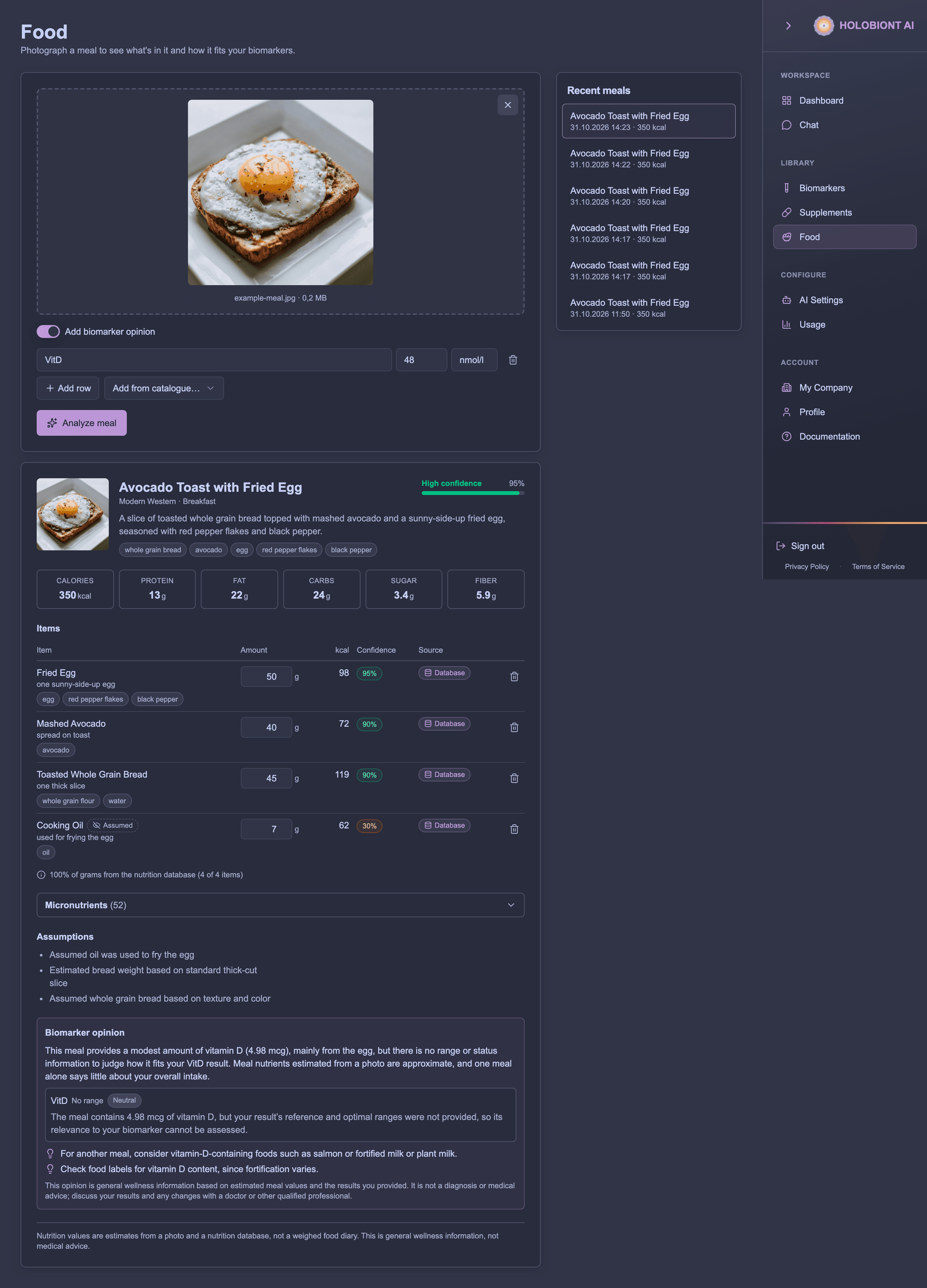
Analyses belong to your company: every key of the company, and the Food page in the dashboard, see the same analyses. The dashboard’s Food page is the easiest way to see what a response contains: photograph a meal there, optionally switch on Add biomarker opinion, and the result shows the same dish, items, totals, assumptions and opinion that the API returns as JSON. Meals analysed through the API also appear under Recent meals.
Billing and rate limits
| Request | Billed |
|---|---|
| Analysing a photo | The AI call plus the platform share, including photos rejected as NOT_FOOD or MEDICATION |
| Biomarker opinion (on its own or with an analysis) | The AI call plus the platform share |
| Nutrition search, food and barcode lookups | 6 credits each |
| Listing and reading analyses | 2 credits each |
| Correcting an analysis | 3 credits |
Files that aren’t images (INVALID_IMAGE) | No (the request is refused) |
Limits apply per API key, per minute:
| Endpoints | Requests per minute |
|---|---|
POST /food/analyze | 120 |
POST /food/biomarker-opinion | 60 |
GET /food/nutrition… lookups and PATCH /food/analyses/{id} | 300 |
GET /food/analyses and GET /food/analyses/{id} | 600 |
Over the limit, you get 429 with code RATE_LIMITED and a Retry-After header giving the seconds to wait.
Analyse a meal photo
POST /food/analyze
Recognises the dish, items, portions and visible ingredients in a photo and adds nutrition from the database. Items the first look is unsure about get a second look from a second model before grounding, so look-alikes (egg whites and white cheese, cauliflower and rice) are settled with the whole plate in view; a clear plate costs one look. A database entry is only used when its energy density agrees with the AI’s own estimate for the item (within a factor of 1.4) and a second, fast judgment confirms it is the same food as served, so a name that happens to match a very different food, say a jelly for sliced strawberries or rice with peas for plain rice, is not taken. Items without a plausible database match use AI estimates (macros only, nutrition_source: "estimate"). The analysis is saved, so you can read and correct it later; the image isn’t.
The photo can be at most 10 MB, in JPEG, PNG, WebP, HEIC, AVIF, GIF or TIFF format. Send it in one of two ways:
multipart/form-data
| Field | Required | Description |
|---|---|---|
image | Yes | The photo file |
locale | No | Language for display names, dish text and assumptions, e.g. fi or fi-FI (default en) |
meal_context | No | A hint of up to 500 characters, e.g. restaurant lunch, half eaten |
include_biomarker_opinion | No | true to also create a biomarker opinion |
biomarkers | With an opinion | A JSON array of biomarkers, as a string |
application/json
| Field | Required | Description |
|---|---|---|
image_base64 | Yes | The photo as base64 or a data URL |
locale | No | As above |
meal_context | No | As above |
include_biomarker_opinion | No | true or false (boolean) |
biomarkers | With an opinion | An array of up to 30 biomarkers |
When include_biomarker_opinion is true, at least one biomarker is required. If the opinion can’t be created, the analysis is still returned with a warning, and you can request the opinion separately.
Response: the analysis, with:
analysis_id,created_at,localedish– title, description, cuisine, meal type and visible ingredientsitems– each item’s Englishname(used for database matching),display_namein your locale,category,estimated_grams,ingredients,confidence(0–1),nutrition_source(databaseorestimate), the databasematch,macrosandmicronutrients. Items markedhidden: trueare likely-hidden components the AI added, such as oil, dressing or sauce.ai_estimate_100gis the AI’s own per-100 g estimate of the macros, kept beside the database values for comparison.totals– calories (calories_kcal), protein, fat, carbohydrates, sugar and fibre in grams, plus saturated fat and sodium when known for every itemmicronutrient_totals– vitamins and minerals from database itemscoverage– how much of the meal (by grams and by items) is grounded in the databaseconfidence– overall confidence (0–1)assumptions,warnings,disclaimeropinion– when requested
Photos that aren’t food are refused with 422: NOT_FOOD when no food or drink is recognised, MEDICATION when the photo looks like medication, and INVALID_IMAGE when the file isn’t a supported image.
curl -X POST https://dashboard.holobiont.io/api/v1/food/analyze \
  -H "Authorization: Bearer hb_live_YOUR_KEY" \
  -F "[email protected]" \
  -F "locale=en" \
  -F "meal_context=restaurant lunch"
With a biomarker opinion, as JSON:
curl -X POST https://dashboard.holobiont.io/api/v1/food/analyze \
  -H "Authorization: Bearer hb_live_YOUR_KEY" \
  -H "Content-Type: application/json" \
  -d '{
    "image_base64": "data:image/jpeg;base64,/9j/4AAQ...",
    "locale": "en",
    "include_biomarker_opinion": true,
    "biomarkers": [{ "acronym": "VitD", "value": 48, "unit": "nmol/l" }]
  }'
Example: one photo, with and without biomarkers
The examples below were produced with this photo. Save it as example-meal.jpg to reproduce them.
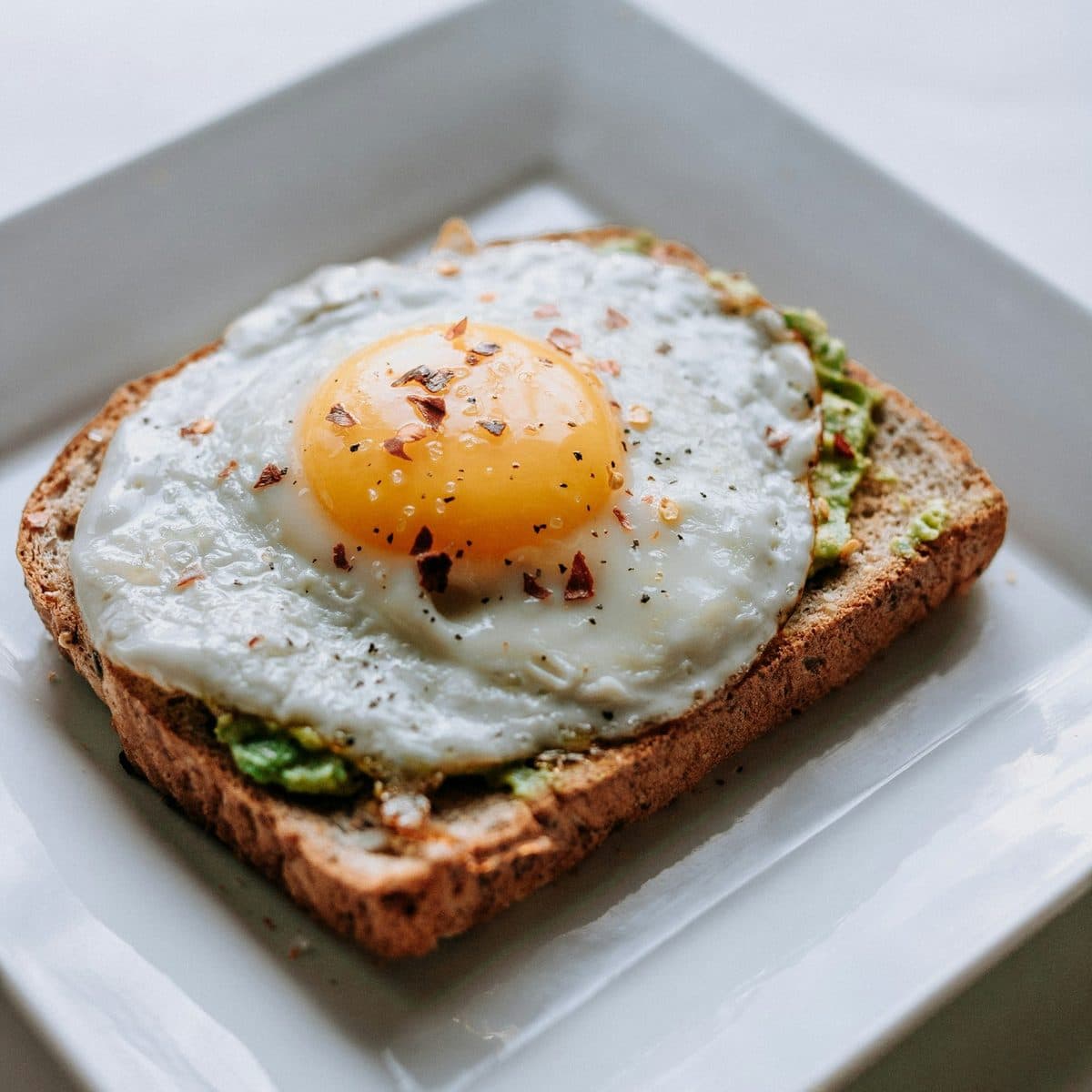
Without biomarkers: send only the photo. The response has no opinion field.
curl -X POST https://dashboard.holobiont.io/api/v1/food/analyze \
  -H "Authorization: Bearer hb_live_YOUR_KEY" \
  -F "[email protected]" \
  -F "locale=en" \
  -F "meal_context=weekday breakfast"
{
"analysis_id": "fa_e195ed53-2916-474a-80cf-f10f79bfe3b9",
"created_at": "2026-10-31T12:17:44.928Z",
"locale": "en",
"dish": {
"title": "Avocado Toast with Fried Egg",
"description": "A slice of toasted whole grain bread topped with mashed avocado and a sunny-side-up fried egg, seasoned with red pepper flakes and black pepper.",
"cuisine": "Modern Western",
"meal_type": "breakfast",
"visible_ingredients": [
"whole grain bread",
"avocado",
"egg",
"red pepper flakes",
"black pepper"
]
},
"confidence": 0.95,
"items": [
{
"name": "fried egg",
"display_name": "fried egg",
"category": "protein",
"cooking_method": "fried",
"portion_description": "one large sunny-side-up egg",
"estimated_grams": 50,
"ingredients": [
"egg",
"red pepper flakes",
"black pepper"
],
"confidence": 0.95,
"nutrition_source": "database",
"match": {
"source": "opennutrition",
"id": "fd_zaagFZNvq83Q",
"name": "Fried Egg",
"score": 215
},
"macros": {
"calories_kcal": 97.5,
"protein_g": 6.6,
"fat_g": 7.4,
"carbs_g": 0.5,
"sugar_g": 0.31,
"fiber_g": 0,
"saturated_fat_g": 2.08,
"sodium_mg": 94.5
},
"micronutrients": [
{
"key": "vitamin_a",
"unit": "mcg",
"label": "Vitamin A",
"amount": 92
},
{
"key": "vitamin_d",
"unit": "mcg",
"label": "Vitamin D",
"amount": 2.05
},
{
"key": "vitamin_e",
"unit": "mg",
"label": "Vitamin E",
"amount": 1.08
},
…
]
},
{
"name": "mashed avocado",
"display_name": "mashed avocado",
"category": "fat",
"cooking_method": "raw",
"portion_description": "spread on toast",
"estimated_grams": 40,
"ingredients": [
"avocado"
],
"confidence": 0.9,
"nutrition_source": "database",
"match": {
"source": "opennutrition",
"id": "fd_33hbx40QaJVc",
"name": "Mashed Avocado by Kroger",
"score": 105
},
"macros": {
"calories_kcal": 71.6,
"protein_g": 0.716,
"fat_g": 5.72,
"carbs_g": 3.57,
"sugar_g": 0.716,
"fiber_g": 2.84,
"saturated_fat_g": 0.716,
"sodium_mg": 122
},
"micronutrients": [ … ]
},
{
"name": "toasted whole grain bread",
"display_name": "toasted whole grain bread",
"category": "grain",
"cooking_method": "toasted",
"portion_description": "one thick slice",
"estimated_grams": 45,
"ingredients": [
"whole grain flour",
"water"
],
"confidence": 0.9,
"nutrition_source": "database",
"match": {
"source": "opennutrition",
"id": "fd_iAO5W3w1B9CC",
"name": "Whole Grain Bread",
"score": 140
},
"macros": {
"calories_kcal": 119,
"protein_g": 5.48,
"fat_g": 1.69,
"carbs_g": 20.2,
"sugar_g": 2.34,
"fiber_g": 3.08,
"saturated_fat_g": 0.419,
"sodium_mg": 207
},
"micronutrients": [ … ]
},
{
"name": "cooking oil",
"display_name": "cooking oil",
"category": "fat",
"cooking_method": "fried",
"portion_description": "used for frying the egg",
"estimated_grams": 7,
"ingredients": [
"oil"
],
"confidence": 0.3,
"hidden": true,
"nutrition_source": "database",
"match": {
"source": "opennutrition",
"id": "fd_Jpmh9o3kzqkZ",
"name": "Vegetable Oil",
"score": 75
},
"macros": {
"calories_kcal": 61.9,
"protein_g": 0,
"fat_g": 7,
"carbs_g": 0,
"sugar_g": 0,
"fiber_g": 0,
"saturated_fat_g": 0.736,
"sodium_mg": 0
},
"micronutrients": [ … ]
}
],
"totals": {
"calories_kcal": 350,
"protein_g": 12.8,
"fat_g": 21.8,
"carbs_g": 24.3,
"sugar_g": 3.37,
"fiber_g": 5.92,
"saturated_fat_g": 3.95,
"sodium_mg": 424
},
"micronutrient_totals": [
{
"key": "vitamin_a",
"unit": "mcg",
"label": "Vitamin A",
"amount": 92
},
{
"key": "vitamin_c",
"unit": "mg",
"label": "Vitamin C",
"amount": 0.045
},
{
"key": "vitamin_d",
"unit": "mcg",
"label": "Vitamin D",
"amount": 4.98
},
…
],
"coverage": {
"grams_grounded": 1,
"items_grounded": 4,
"items_total": 4
},
"assumptions": [
"Assumed oil was used to fry the egg",
"Estimated bread weight based on standard thick-cut slice",
"Assumed avocado is plain without added mayo or cream"
],
"warnings": [],
"disclaimer": "Nutrition values are estimates from a photo and a nutrition database, not a weighed food diary. This is general wellness information, not medical advice."
}Micronutrient lists are shortened here; a real response lists every vitamin and mineral the database knows for each item and in micronutrient_totals.
With biomarkers: add include_biomarker_opinion=true and a biomarkers field. As multipart form data the array is sent as a JSON string:
curl -X POST https://dashboard.holobiont.io/api/v1/food/analyze \
  -H "Authorization: Bearer hb_live_YOUR_KEY" \
  -F "[email protected]" \
  -F "locale=en" \
  -F "include_biomarker_opinion=true" \
  -F 'biomarkers=[{"acronym":"VitD","value":48,"unit":"nmol/l"},{"acronym":"Ferritin","value":18,"unit":"µg/l"},{"acronym":"LDL","value":3.9,"unit":"mmol/l"}]'
The response is the same analysis plus an opinion. Here VitD matched a biomarker in the company’s biomarker list, so its reference range came from there and the status is low; Ferritin and LDL had no ranges, so their status is unknown. Pass ref_min and ref_max (and optimal_min, optimal_max) with each biomarker when it isn’t in your list.
{
  "analysis_id": "fa_5f526444-773b-4157-b0ef-d50b57f15470",
  … the same analysis fields as above …,
  "opinion": {
    "summary": "This meal provides some vitamin D from the egg, which is relevant to your low 25-OH vitamin D result, though one meal cannot establish whether your overall intake is enough. The meal’s estimated values are based on a photo, and the LDL and ferritin results are marked unknown, so they can’t be interpreted from the information provided.",
    "per_biomarker": [
      {
        "biomarker": "25-OH Vitamin D (VitD)",
        "status": "low",
        "nutrients_in_meal": [
          {
            "key": "vitamin_d",
            "unit": "mcg",
            "label": "Vitamin D",
            "amount": 4.98
          }
        ],
        "relevance": "supportive",
        "comment": "The egg contributes an estimated 4.98 mcg of vitamin D, making this meal a source of vitamin D in light of your low result. One meal alone is unlikely to tell us whether your overall intake is adequate."
      },
      {
        "biomarker": "Ferritin",
        "status": "unknown",
        "nutrients_in_meal": [],
        "relevance": "neutral",
        "comment": "No meal nutrients are linked to ferritin here, and the result is marked unknown, so this meal cannot be assessed in relation to it."
      },
      {
        "biomarker": "LDL",
        "status": "unknown",
        "nutrients_in_meal": [
          {
            "key": "cholesterol",
            "unit": "mg",
            "label": "Cholesterol",
            "amount": 200
          },
          {
            "key": "saturated_fat",
            "label": "Saturated fat",
            "amount": 3.95,
            "unit": "g"
          }
        ],
        "relevance": "neutral",
        "comment": "The meal includes 200 mg cholesterol and an estimated 3.95 g saturated fat, but your LDL result is marked unknown, so its relevance to your result can’t be determined from the information provided."
      }
    ],
    "suggestions": [
      "For another vitamin D food source, consider including fortified milk or a fortified plant drink with a meal.",
      "Add a vitamin C-rich fruit or vegetable, such as berries or bell pepper, alongside whole-grain bread.",
      "If you’d like to support a heart-conscious eating pattern, try using less cooking oil or replacing some of it with extra avocado."
    ],
    "disclaimer": "This opinion is general wellness information based on estimated meal values and the results you provided. It is not a diagnosis or medical advice; discuss your results and any changes with a doctor or other qualified professional."
  }
}
Ingredient identities and reference compositions
New food analyses include the optional ingredient_analysis object. observed contains the
analysis’s visible ingredients, and inferred contains likely hidden components. Entries carry
their original name, parent item_indexes, confidence, and a FoodOn identity when a unique
primary label or exact synonym matches. Broad and narrow synonyms are not collapsed.
An optional expanded second-look pass can review compound foods with sparse ingredient lists. It uses the photograph and, when available, USDA reference examples to check component coverage. Simple foods with confident identification and adequate ingredient lists do not trigger it. This shares the second-look pass used for ambiguous foods. The expanded ingredient review is experimental and disabled by default. Identity review is also optional and off unless a second-look model is configured for the deployment.
Each food item can include inferred_ingredients, containing a name, confidence estimate and
reason for a likely component. Accepted entries require confidence of at least 0.7 and a reason;
they are unverified estimates, not confirmed contents or allergy assurances. They appear in
ingredient_analysis.inferred, never in dish.visible_ingredients. A component remains part
of its parent’s existing weight and nutrition, so it adds no separate calories or portions.
Ingredient-only review cannot replace a confidently identified food or alter its weight.
reference_compositions attaches USDA FNDDS food formulations and household portions to
matching meal items. These are reference data: FNDDS includes both recipes and survey-weighted
food composites. Their components are not confirmed ingredients of the photographed meal,
and reference_grams are not estimates of that meal’s ingredient weights. References do not
add portions or nutrients to totals.
status describes catalog availability (ready, partial, unavailable), not food-recognition
confidence. Missing reference data does not fail an analysis. Corrections rebuild existing
enrichment so removed foods, renamed foods and item indexes do not leave stale references.
Each response includes source attribution and release information: FoodOn (CC BY 4.0) and USDA FNDDS (CC0). Retain these attributions when displaying their reference data. Older saved analyses may omit this object.
Biomarker opinion
POST /food/biomarker-opinion
An AI opinion on a meal against nutritional biomarkers. The status of each biomarker is computed from its ranges, the meal’s relevant nutrients are linked to it, and the AI writes the narrative. This is general wellness information, not medical advice.
| Field | Required | Description |
|---|---|---|
analysis_id | One of these two | An analysis to comment on. The opinion is also saved on that analysis. |
items | One of these two | Up to 30 meal items, e.g. from an analysis response: name, estimated_grams and macros are required; display_name, nutrition_source and micronutrients are optional |
dish | No | title and description of the meal, used with items |
locale | No | Language of the opinion (default: the analysis’s language, or en) |
biomarkers | Yes | 1–30 biomarkers |
Send either analysis_id or items, not both.
Response: analysis_id (or null when you sent items) and opinion, with:
summaryper_biomarker– for each biomarker itsstatus(low,optimal,in_range,highorunknown),relevanceto the meal (supportive,neutralorcaution), the relatednutrients_in_mealand acommentsuggestionsanddisclaimer
curl -X POST https://dashboard.holobiont.io/api/v1/food/biomarker-opinion \
  -H "Authorization: Bearer hb_live_YOUR_KEY" \
  -H "Content-Type: application/json" \
  -d '{
    "analysis_id": "ANALYSIS_ID",
    "biomarkers": [
      { "acronym": "VitD", "value": 48, "unit": "nmol/l", "ref_min": 50, "ref_max": 150 },
      { "name": "Ferritin", "value": 35, "unit": "ug/l" }
    ]
  }'
Biomarker input
Each biomarker needs an acronym or a name, and a value:
| Field | Description |
|---|---|
acronym | e.g. VitD |
name | e.g. Vitamin D (25-OH) |
value | The measured value (number, required) |
unit | e.g. nmol/l |
sample_date | Date of the sample, e.g. 2026-09-15 |
ref_min, ref_max | Reference range |
optimal_min, optimal_max | Optimal range |
Missing ranges are filled in from your company’s biomarker list when the acronym (or name) and unit match.
List analyses
GET /food/analyses
Your company’s analyses, newest first, with corrections applied.
| Query parameter | Description |
|---|---|
page | Page number, from 1 (default 1) |
pageSize | Analyses per page, 1–100 (default 20) |
Response: analyses (an array of analyses), total, page and pageSize.
curl "https://dashboard.holobiont.io/api/v1/food/analyses?page=1&pageSize=20" \
  -H "Authorization: Bearer hb_live_YOUR_KEY"
Get an analysis
GET /food/analyses/{id}
One analysis by its analysis_id, with corrections applied. Returns 404 if your company has no analysis with that id.
curl https://dashboard.holobiont.io/api/v1/food/analyses/ANALYSIS_ID \
  -H "Authorization: Bearer hb_live_YOUR_KEY"
Correct an analysis
PATCH /food/analyses/{id}
Fix what the AI got wrong: change an item’s grams (its nutrients are rescaled), rename it (it’s matched in the database again) or remove it. Totals, coverage and confidence are recalculated, and corrected items get confidence 1. Any saved biomarker opinion is dropped, so request a new one if you need it. No AI call is made, so corrections are free.
The body has an items array of 1–50 corrections:
| Field | Required | Description |
|---|---|---|
index | Yes | Position of the item in the analysis’s items array, from 0 |
estimated_grams | No | New weight, 5–2000 g |
name | No | New name, in English |
remove | No | true to remove the item |
Response: the updated analysis, with corrected_at set.
curl -X PATCH https://dashboard.holobiont.io/api/v1/food/analyses/ANALYSIS_ID \
  -H "Authorization: Bearer hb_live_YOUR_KEY" \
  -H "Content-Type: application/json" \
  -d '{
    "items": [
      { "index": 0, "estimated_grams": 180 },
      { "index": 1, "name": "brown rice" },
      { "index": 3, "remove": true }
    ]
  }'
Search foods
GET /food/nutrition
Search the nutrition database by food name. Free.
| Query parameter | Description |
|---|---|
query | Food name, 2–120 characters (required) |
limit | Number of results, 1–25 (default 10) |
locale | en (default), fi or sv: the language of Fineli food names in the results |
Response: foods, best name match first. Each food has an id, name, source, ean13 (for packaged foods), macros_100g and micronutrients_100g, all per 100 g. Results come from the main database (source: "opennutrition") and from Fineli, the Finnish food composition database (source: "fineli", ids like fineli:1036), which covers Finnish foods and dishes with 74 components each; a Fineli food searched in Finnish (locale=fi, e.g. query=ruisleipä) comes back with its Finnish name.
curl "https://dashboard.holobiont.io/api/v1/food/nutrition?query=oatmeal&limit=5" \
  -H "Authorization: Bearer hb_live_YOUR_KEY"
Get a food
GET /food/nutrition/{foodId}
One food by its id, as returned by the search or in an analysis item’s match.id. Ids look like fd_qE68Xid5e6F7. Returns the food (per 100 g), or 404 if it isn’t found. Free.
curl https://dashboard.holobiont.io/api/v1/food/nutrition/fd_qE68Xid5e6F7 \
  -H "Authorization: Bearer hb_live_YOUR_KEY"
Get a food by barcode
GET /food/nutrition/barcode/{ean13}
A packaged food by its 13-digit EAN barcode. The main database is tried first; a barcode it does not carry is looked up on Open Food Facts (source: "openfoodfacts", data under the Open Database License), which covers most European grocery products, including Nordic ones. The barcode’s check digit is validated; an invalid barcode returns 400, and an unknown one 404. Returns the food (per 100 g). Free.
curl https://dashboard.holobiont.io/api/v1/food/nutrition/barcode/0016000170032 \
-H "Authorization: Bearer hb_live_YOUR_KEY"Response: the packaged food with its ean13, macros_100g and micronutrients_100g (shortened here):
{
  "id": "fd_6HBkB6T1kVIk",
  "name": "Original Cheerios by Cheerios",
  "source": "opennutrition",
  "ean13": "0016000170032",
  "macros_100g": {
    "calories_kcal": 367,
    "protein_g": 13,
    "fat_g": 6.7,
    "carbs_g": 73.7,
    "sugar_g": 4.56,
    "fiber_g": 10.8,
    "saturated_fat_g": 1.38,
    "sodium_mg": 498
  },
  "micronutrients_100g": [
    {
      "key": "vitamin_a",
      "label": "Vitamin A",
      "unit": "mcg",
      "amount": 231
    },
    {
      "key": "vitamin_c",
      "label": "Vitamin C",
      "unit": "mg",
      "amount": 15.4
    },
    {
      "key": "vitamin_d",
      "label": "Vitamin D",
      "unit": "mcg",
      "amount": 10.3
    },
    {
      "key": "vitamin_e",
      "label": "Vitamin E",
      "unit": "mg",
      "amount": 2.56
    },
    …
  ]
}
Barcode coverage comes from the nutrition database and is strongest for products sold in the United States. Fall back to searching by name when a barcode isn’t found.
Food error codes
| Status | Code | Meaning |
|---|---|---|
400 | – | Invalid request: a missing or invalid field, parameter, correction or barcode. |
402 | CREDITS_EXHAUSTED | Your company’s credits don’t cover the call. The body also has balance and required (in euros). |
402 | PLAN_LIMIT | Your account’s monthly limit on food analyses has been reached. |
403 | PLAN_LIMIT | Food analysis isn’t available for your account. |
404 | – | The analysis or food wasn’t found. |
413 | – | The image is larger than 10 MB. |
415 | – | POST /food/analyze was sent with a content type other than multipart/form-data or application/json. |
422 | INVALID_IMAGE | The file isn’t a supported image. Not billed. |
422 | NOT_FOOD | No food or drink was recognised in the photo. Billed. |
422 | MEDICATION | The photo looks like medication; the API covers food and drinks only. Billed. |
502 | – | The AI didn’t return a usable answer. The call may still be billed. Try again. |
503 | – | The nutrition database is temporarily unavailable. Try again later. |
Interactive reference
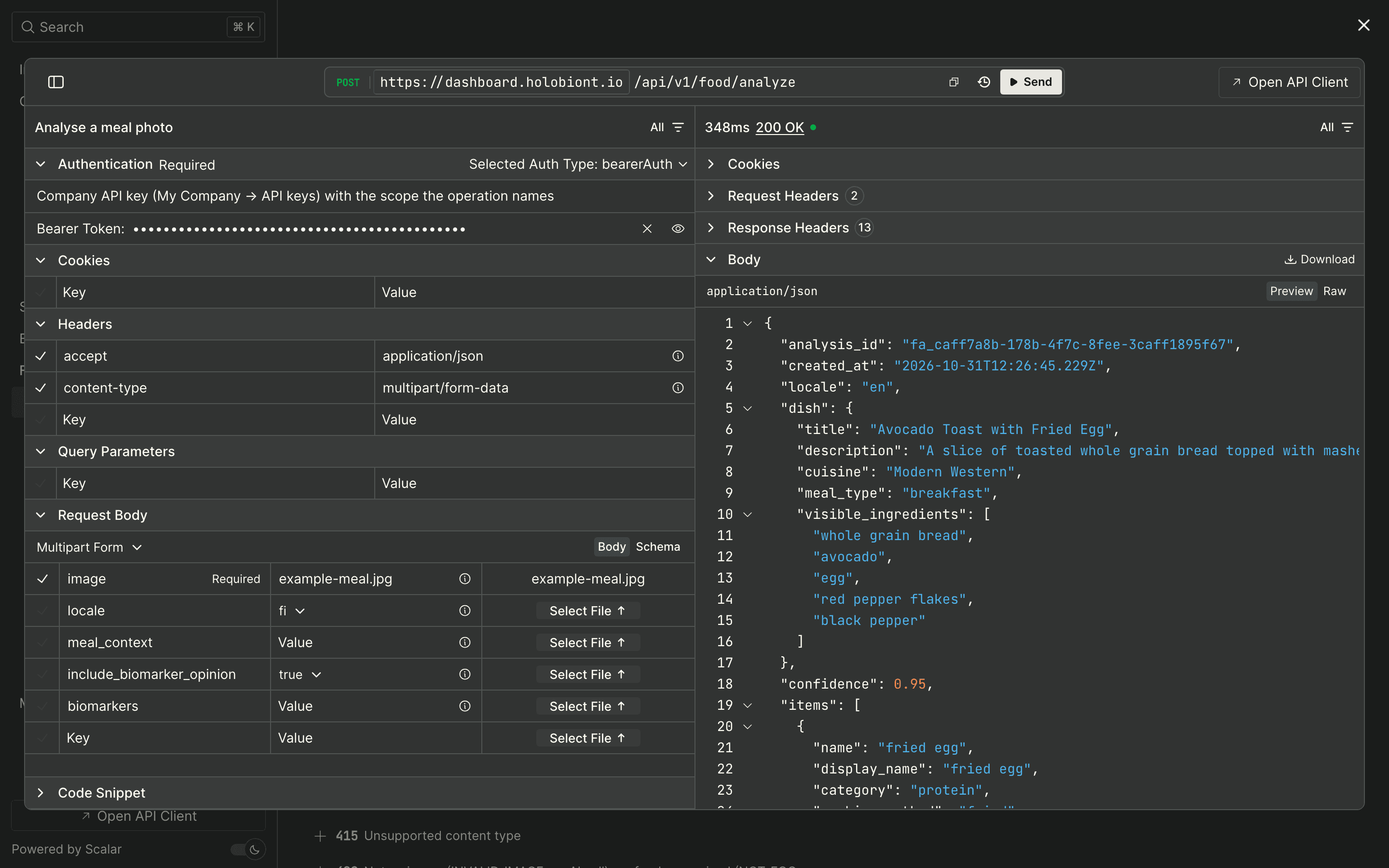
The interactive API reference lists every endpoint with its full request and response schemas, and lets you send real requests from the browser. The same description is available as an OpenAPI 3 document at https://dashboard.holobiont.io/api/v1/openapi.json for generating client code.
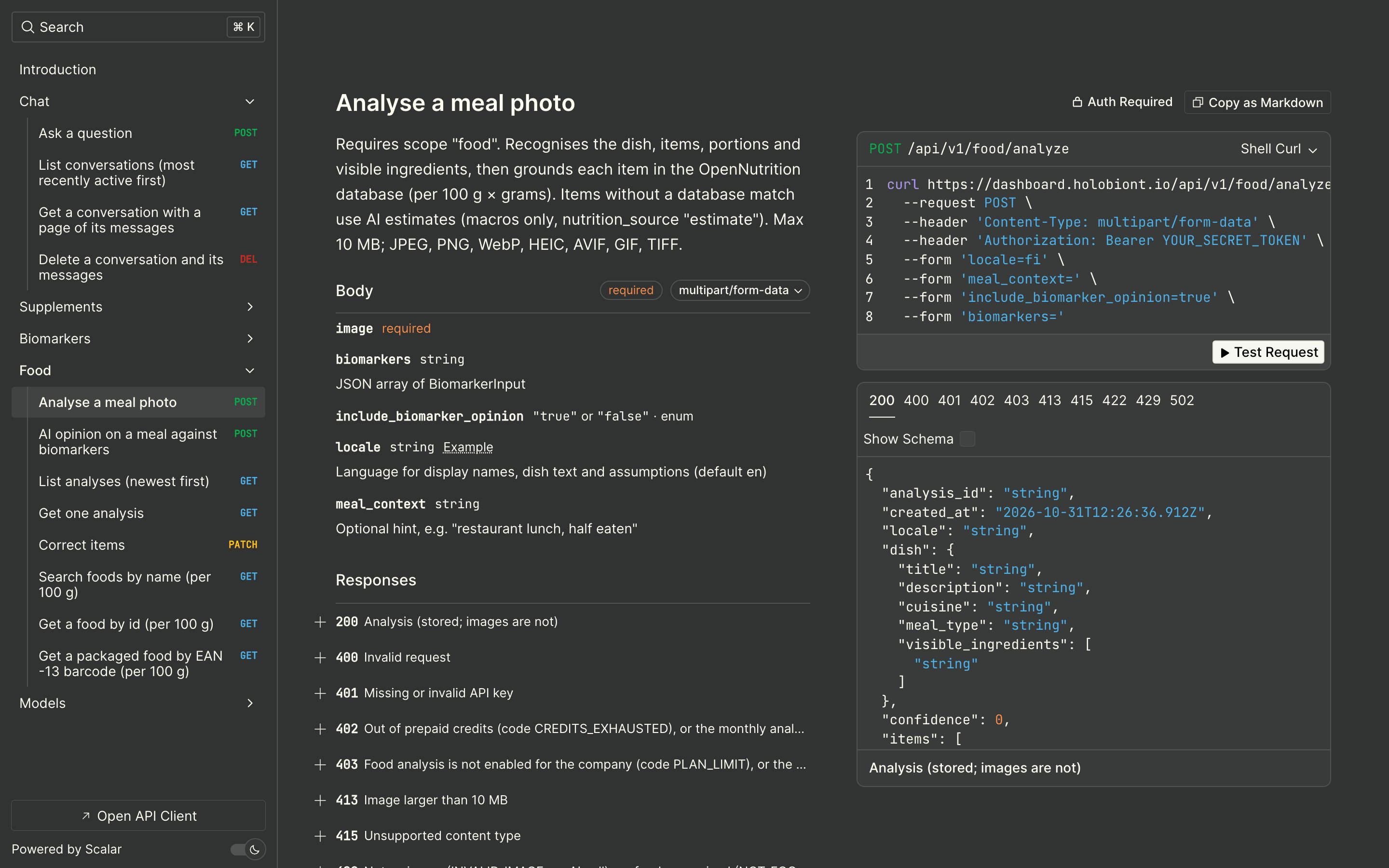
To try a call without writing code:
- Open the endpoint in the left-hand list, for example Food → Analyse a meal photo, and click Test Request.
- Paste your API key into Bearer Token. It stays in your browser.
- Fill in the request: for a photo, click Select File on the
imagerow; tick the other rows you want to send, such asinclude_biomarker_opinionandbiomarkers. - Click Send. The response, its status and headers appear on the right. Calls made this way are real: they are charged and appear in your usage and under Recent meals.
Next steps
- My Company – create and revoke API keys
- Credits – buy credits and set up auto-recharge
- Usage Statistics – follow your usage
- AI Chat Interface, Supplement Management, Biomarker Management and Food – the same features in the dashboard